


WaySense
4.21.00 Reviews
App Specs
- Version
- 1.12.0
- Updated On
- License
- Free
- Downloads
- 10,000+
- Developer
- FiglioTech
- Categories
- Parenting
- Platform
- Android
Screenshots
 Analysis by AppCompare
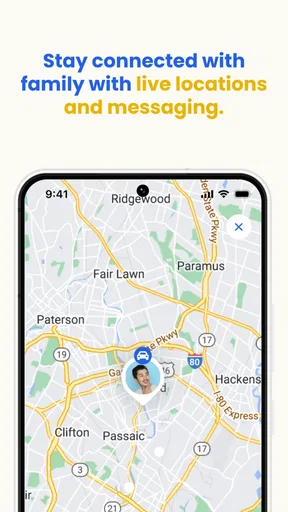
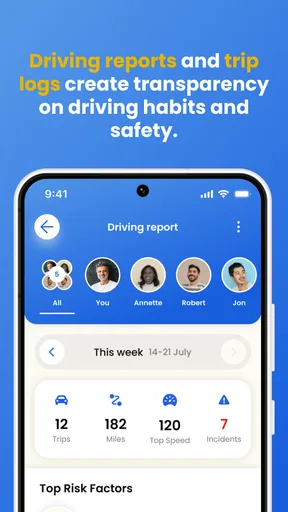
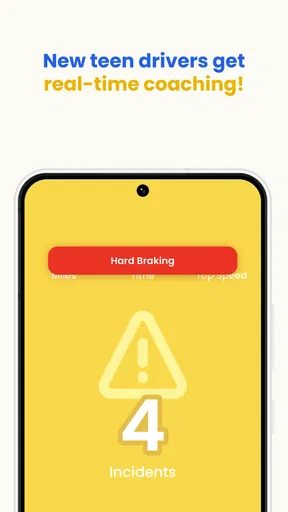
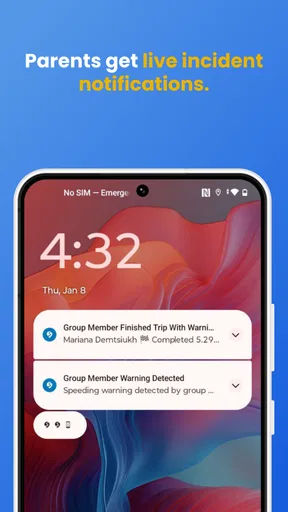
Teen driving is one of those parenting challenges where reassurance and useful evidence do not always arrive together. I found WaySense interesting because it is built around that gap: it helps families follow driving activity, coach a young driver, and react to alerts or recorded video when something deserves attention. That makes it more focused than a general family-location tool, but it also means the value depends heavily on careful setup and on how openly the family agrees to use it.
As a parenting app from FiglioTech, WaySense is aimed at the period when a teenager is gaining independence behind the wheel. It is free to install, rated for Everyone, and currently listed as version 1.12.0 for devices running Android 9 or later. The average rating is 4.2 from around a dozen ratings, while adoption has passed 10K installs. Those figures suggest a small but real user base rather than a mature, widely tested platform, so I would approach it as a practical tool that deserves a little patience during setup.
Getting past the points where families usually get stuck
The first friction is not necessarily technical. A driving-safety app only works well when the parent and teen understand what it is meant to do. If the teenager thinks every alert will trigger an argument, they may avoid opening the app or treat it as surveillance. I would explain the purpose before installing it: the goal is to review risky moments, discuss them calmly, and make future trips safer. That conversation is part of the setup, not an optional extra.
The second obstacle is expecting the app to behave like a complete replacement for attention, instruction, or emergency services. WaySense can support a family’s driving routine with tracking, coaching, video evidence, and real-time alerts, but it cannot make a distracted driver safe by itself. I would use it as a conversation aid and a way to notice patterns, not as permission to stop checking in with a new driver.
There is also a practical question about whose phone does what. Before starting, I would identify the parent’s device, the teen’s device, and the account or invitation flow used to connect them. A surprising amount of setup trouble comes from signing into the wrong account, switching between family members, or assuming that installing the app automatically links everyone. If the app presents a pairing or invitation step, complete that deliberately and verify the relationship before relying on alerts.
Keep the first test simple. I would not begin with a long trip, a busy school run, or a drive where an important alert is expected. Instead, check that the relevant devices are signed in, that the family connection is visible, and that notifications are allowed. Then take a short, ordinary drive and review what appeared afterward. This gives you a clean baseline and makes it easier to tell whether a later problem comes from the app, the phone, or the driving environment.
The most useful setup habit is to test the complete chain, not just the installation. A parent should know where an alert appears, where video evidence can be reviewed, and how the teen sees the coaching side of the experience. If you only confirm that the app opens, you have not really confirmed that it is ready for a real trip.
Worth Reading Before You Choose

Flipboard Shows What News Apps Must Do Beyond the Feed

Switching to Android Auto Means Rethinking Your Driving Routine

Google Calendar Makes a Crowded Week Easier to Manage

Ludo King Makes the Most of the Minutes Between Plans

Baby Panda World Brings Quick Play to Modern Phones, but Its Game Library Feels Busy

ESPN’s Live Game View Makes Following Close Games Easier
Checks that prevent avoidable setup confusion
Start with the basics that affect any safety-focused mobile app. Make sure both devices have a stable internet connection during account setup, the operating system meets the Android 9 minimum when using Android, and the current app version is installed. On iPhone, I would similarly keep the operating system and app current, because compatibility issues often look like missing features or delayed updates rather than an obvious error.
Notifications deserve special attention. A real-time alert is only useful if the phone is allowed to display it and the user has not muted the app. Check the system notification settings, notification volume, and any focus or do-not-disturb mode that might silence warnings. If the parent uses a smartwatch, car display, or another notification filter, I would not assume every alert will pass through unchanged; test the phone itself first.
Battery management can also interfere with timely updates. Some phones restrict background activity to extend battery life, and that can affect apps that need to remain available during a trip. Rather than changing every battery setting immediately, I would first observe whether the app stops updating when the screen is off or when the phone is locked. If it does, review the device’s battery optimization settings for WaySense and apply the least aggressive adjustment available.
Do not forget physical placement. A phone that is buried under clothing, left in a bag, or moved between passengers can produce confusing results for any driving-monitoring workflow. The safest arrangement is one that does not require the driver to touch the phone. I would secure the device before the trip and avoid making adjustments while the car is moving.
For video evidence, storage and connectivity are worth checking without making assumptions about how the app handles every recording. Confirm that the phone has reasonable free space and that the app can complete a short test rather than judging it from an interrupted preview. If a clip takes time to appear, wait until the drive has ended and the connection is stable before deciding that it failed.
Families should also decide who is allowed to review driving events. Even with an Everyone content rating, the subject matter is sensitive because recordings and alerts can affect trust within the household. Agree on a routine: perhaps review notable events at home rather than reacting instantly to every notification. This turns the app into a coaching tool instead of a source of constant tension.
A workable daily routine for parents and teen drivers
A realistic use case is the school commute. Before leaving, the teen secures the phone and starts the trip without handling it. The parent does not watch the screen continuously; instead, they wait for an alert or review the trip later. If a video clip or driving event needs discussion, the parent can ask what happened first, listen to the explanation, and then focus on one improvement for the next drive.
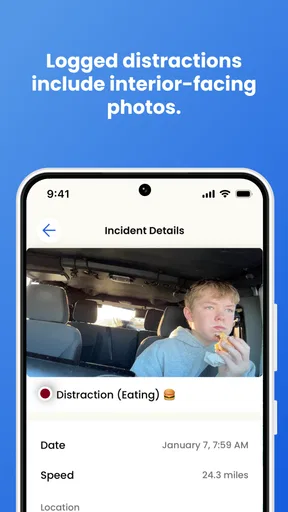
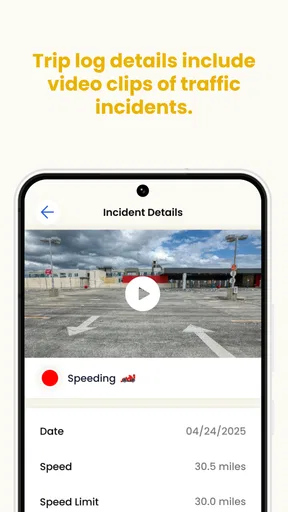
That last point matters. Video evidence can make a conversation more concrete, but replaying every uncomfortable moment may feel punitive. I would use one event to identify a specific habit, such as leaving more following distance or reducing phone-related distractions, then check whether the behavior improves over several trips. The app is more helpful when it supports a repeatable coaching loop than when it becomes a scoreboard.
Another useful workflow is to separate urgent alerts from routine review. A real-time warning may deserve immediate attention, while a minor event can wait until the driver is parked. Parents should avoid calling or messaging a teen during a drive unless there is a genuine emergency. The safest response to an alert is often to wait for the vehicle to stop, then discuss it.
For families with more than one young driver, label the household routine clearly. Confirm which account belongs to which person and review one trip at a time. Mixing profiles can lead to unfair conclusions, especially when a parent assumes that one driver’s event belongs to another. This is a small administrative step, but it protects the usefulness of the coaching history.
I also recommend agreeing on what success looks like before collecting lots of information. Is the family trying to reduce harsh driving events, make night driving more comfortable, or build confidence after the first license? A clear goal helps parents ignore noise and prevents the app from taking over every conversation about the car.
Recovering when tracking, alerts, or evidence seem incomplete
When something does not appear correctly, resist the urge to reinstall immediately. First note what actually failed: was the trip missing, was an alert late, or did the video evidence take time to load? These are different problems and may have different causes. Record whether the phone was locked, whether the connection changed, and whether the issue happened once or repeatedly.
For a missing or incomplete trip, check the account connection and the phone’s battery restrictions before doing anything drastic. Then repeat a short test with the devices charged and connected. If the second test works, the original problem may have been temporary connectivity or a background restriction. If it fails in the same way, capture the app version, device model, and exact sequence of steps before contacting FiglioTech support.
For delayed alerts, compare the timing with the phone’s notification history and connection status. A notification that arrived late is not the same as an event that was never recorded. Also check whether a focus mode, silent setting, or weak signal affected delivery. I would avoid promising the family that every warning will be instantaneous; instead, treat alerts as an aid that should be tested in the conditions where you plan to depend on it.
If video evidence is unavailable, wait until the trip is complete and the device has a reliable connection. Check free storage and whether the app is up to date. Do not repeatedly start and stop a drive just to force a clip to appear, because that can make the test harder to interpret. A single controlled retry is more useful than a string of random changes.
When troubleshooting, protect the record of what happened. Before clearing data or deleting the app, note the account used and any settings you may need to restore. Reinstallation can remove local state or require the family connection to be established again. It should be a later step, not the first response to a confusing screen.
Recognizing when the phone, car, or environment is responsible
WaySense is not always the cause of an unreliable result. A phone with a weak battery, poor mobile coverage, an overloaded storage system, or aggressive background limits can interrupt a driving workflow even when the app itself is functioning normally. The car environment matters too: a phone may overheat in direct sun, lose a stable position, or be moved by a passenger.
Driving conditions can create misleading impressions as well. Tunnels, underground parking, dense urban streets, and rural areas with inconsistent connectivity may affect how quickly information reaches the parent. A short delay in one location does not prove that the app will behave the same way everywhere. Test in the routes your teen actually drives, and keep the limitations of mobile connectivity in mind.
Human behavior is another variable. If a teen forgets to secure the phone, signs out, disables notifications, or changes devices without reconnecting the family account, the resulting gap may look like an app failure. A brief pre-drive checklist is more effective than repeatedly blaming the software. The checklist can be as simple as phone secured, account connected, battery adequate, and no distracting interaction while driving.
Parents should also distinguish a safety alert from a confirmed explanation. An alert may tell you that something deserves review, but it does not automatically explain why it happened. Traffic, road design, weather, a sudden obstacle, or another driver may all be relevant. Use the video and trip context as prompts for questions rather than as a substitute for judgment.
This is where a traditional alternative can be better. If your main need is basic location sharing, a general family-location service may be simpler and less intrusive. If you need formal fleet-style reporting, professional vehicle hardware may offer a more specialized workflow. If the teenager is not ready to accept transparent monitoring, no app will solve the trust problem. WaySense makes the most sense for families specifically seeking driving-focused coaching and evidence, and who are willing to maintain the setup.
Cost, privacy, and the decision to continue
WaySense can be downloaded for free, but optional in-app purchases range from about twelve dollars to around one hundred fifty dollars per item. I would not assume that installing the app means every advanced part of the experience is included. Before paying, read the purchase screen carefully and decide which capability solves a real family problem. A paid option is easier to justify when you already know that the free experience fits your routine.
The purchase range also makes it important to avoid buying out of anxiety after one worrying drive. Give the basic workflow enough time to evaluate whether alerts, coaching, and video review are genuinely changing conversations. If the family rarely checks the app or the teen drives only occasionally, a costly upgrade may add complexity without adding much safety value.
Privacy should be discussed in plain language between parent and teen. Decide when recordings are reviewed, who can see them, and how long the family intends to keep using the system. I would be especially careful with younger siblings or passengers who may appear in a recording. The app’s Everyone rating describes its content classification, not a guarantee that every family will find its monitoring approach comfortable.
There is also a fairness issue. If a parent reacts more strongly to every alert than to the teen’s overall improvement, the system can discourage honest communication. Set a review schedule and praise good decisions as clearly as you address mistakes. The strongest use of this app is collaborative: the parent brings context and experience, while the teen learns to interpret feedback without feeling that one event defines them.
My practical verdict after looking at the whole workflow
I see WaySense as a focused parenting app for families who want more than a map showing where a young driver is. Its combination of driving oversight, coaching, video evidence, and real-time alerts gives parents material for specific conversations instead of relying only on a teenager’s memory of a trip. That is its clearest strength.
Its weakness is equally practical: the experience depends on a connected family setup, a properly configured phone, sensible notification settings, and a shared agreement about monitoring. A parent who expects silent, flawless supervision may become frustrated. A teen who feels watched rather than supported may resist it. The app cannot remove those relationship and device-management challenges.
I would recommend trying the free installation with a short test drive, a written household agreement, and a clear coaching goal. Check the complete alert and review path before using it on important journeys, and troubleshoot methodically instead of reinstalling at the first odd result. If the family wants driving-specific evidence and is prepared to discuss it responsibly, WaySense is worth considering.
I would skip it when basic location sharing is all you need, when the family cannot agree on transparent use, or when the available phone and connectivity conditions are too unreliable for timely information. For everyone else, the app is best understood not as a digital substitute for parenting, but as a structured aid for helping a new driver build safer habits.
My final view is cautiously positive. FiglioTech has positioned WaySense around a real need, and the current release offers a useful direction for parents who want practical insight into teen driving. Just keep expectations grounded: test the workflow, respect the limits of mobile technology, and make the human conversation more important than any single alert or clip.
Pros
- Provides clear navigation guidance for everyday trips.
- Useful route information helps users plan journeys in advance.
- Simple interface makes core features easy to access.
- Can improve awareness of nearby roads and travel conditions.
- Helpful for users seeking an alternative to standard map apps.
Cons
- Accuracy may vary depending on location and available map data.
- Some features may require an active internet connection.
- Route suggestions can occasionally be slower than expected.
- Battery and mobile data use may increase during extended trips.
- The app may have limited usefulness in areas with sparse coverage.
FAQs for WaySense
What is WaySense and what does it do?
WaySense is a navigation and location-based app designed to help users understand their surroundings and plan journeys more confidently. Depending on the available features and permissions, it may provide route guidance, location information, alerts, or context about places along the way. Before downloading, check the current store description because supported tools can vary by device, operating system, and region.
Does WaySense require an internet connection to work?
WaySense may rely on an internet connection for functions such as downloading map data, searching for destinations, receiving live updates, or loading location-based information. Some navigation or previously cached content might remain available offline, but this should not be assumed for every feature. If you plan to use the app while traveling, verify its offline capabilities and download any necessary data in advance.
What permissions does WaySense request, and are they necessary?
A navigation-focused app such as WaySense may request access to your location, notifications, mobile data, and possibly background activity. Location access is generally needed for accurate positioning and route guidance, while background permission may support alerts when the app is not open. Review each request carefully, choose the least intrusive option that still provides the features you need, and check the privacy policy before granting access.
Is WaySense free to download, and does it include in-app purchases?
The availability and pricing of WaySense can depend on the platform, country, and current version. An app may be free to install while offering optional subscriptions, premium navigation tools, advertising removal, or additional location features through in-app purchases. Check the Google Play Store or Apple App Store listing for the latest pricing, trial conditions, recurring billing details, and whether any important features are restricted to paid users.
Is WaySense suitable for every phone and operating system?
WaySense may be available for Android, iPhone, or both, but compatibility is determined by the developer’s current release and your device specifications. Older phones may experience slower performance, reduced GPS accuracy, or limited access to newer features. Before installing, review the required Android or iOS version, storage needs, recent user feedback, and whether the app supports your region and preferred language.


